This guide explains how to redirect users from broad or generic search queries (for example, “black dress”) to curated, higher‑value category pages (such as “Evening Dresses – New Collection”).
This tactic helps you align search-driven product discovery with merchandising and profitability goals by directing high-intent traffic toward high-margin, seasonal, or strategically important collections instead of default, relevance-only results.
When to use this tactic
This approach is particularly effective when:
- Generic queries tend to surface low-margin basics by default.
You want search traffic to favor specific collections, launches, or inventory priorities.
You need to influence discovery order without changing ranking logic or pricing.
You want to move inventory through curation and placement rather than discounts.
Business Impact
Redirecting Semantic Search traffic to optimized category pages enables you to:
- Control what sells first: Direct traffic toward collections that matter most to your business.
- Improve profitability: Boost discovery of high‑margin items without relying on price reductions.
- Support inventory goals: Accelerate turnover for new or slow‑moving collections.
- Create a better user experience: Help users quickly land on the content that is both relevant and desirable.
Step-by-step: Create a redirect experience in Experience Search
Step 1: Create a new experience and define targeting
- In Experience Search, create a new experience.
- In the Targeting tab, add the search terms or phrases that should trigger the redirect (for example, “black dress”, “evening dresses”).
- You can enter multiple queries or paste in a list.
→ This ensures the redirect fires only when users enter the designated phrases.
Step 2: Create a new variation
- Navigate to the Variations tab.
- Select New Variation.
→ This variation will contain the logic that defines the redirect.
Step 3: Add custom JSON in the JSON tab
- Open the JSON tab within the variation.
- Add a simple key/value structure to prepare for the redirect URL:
{
  "url": "url"
}
→ This placeholder will be converted into a variable.
Step 4: Convert the URL value into a variable
- Double‑click the second "url" string.
- In the overlay prompt, select Convert to variable.
→ This enables you to provide a dynamic URL value to use during the redirect.
Step 5: Name the variable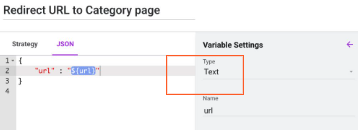
- In the variable settings panel, name the variable (for example, url).
- Keep the type as Text.
→ This variable becomes the input for the destination page you want users to land on.
Step 6: Configure the strategy and add the redirect URL
- Return to the Strategy tab of the variation.
- Paste the target URL for the optimized category page you want to promote. For example:
https://www.yoursite.com/eveningdressesnewcollection/women- Save the experience.
→ When the experience is activated, the configured URL is returned for users whose searches match the designated keywords. The site can then use this value to redirect users to the curated page instead of the default results.
Example use case
Scenario
A fashion brand launches a new collaboration collection with higher margins than its core dress assortment. However, broad search queries such as “black dress” primarily return basic items, limiting exposure to the new collection and slowing its sell-through.
Optimization strategy
The brand configures a redirect experience so that broad, dress-related semantic queries lead to a curated category page featuring the new collaboration. Say, “Evening Dresses – New Collection.”
Outcome
The new collection receives immediate visibility from high-intent search traffic.
Sell-through of newly launched inventory improves without introducing discounts.
High-margin items gain exposure earlier in the shopping journey.
Search traffic contributes directly to merchandising and launch objectives.
Summary
This tactic provides a simple but powerful way to influence product discovery from search, ensuring that valuable collections receive the visibility you desire. By setting up your Search experience this way, you can quickly steer users toward optimized pages that support your merchandising, inventory, and profitability objectives — aligning product discovery with business goals without changing pricing or core search relevance