Tips & Tricks: New Users


A New User in Dynamic Yield
A new user is one who is being tracked for the first time since the Dynamic Yield scripts were implemented on your site
- Dynamic Yield sets a DYID cookie1 on the first page view of each user. This cookie expires after 14 months
- The DYID cookie includes a unique ID as well as a timestamp (the exact time the cookie was set)
- If, when the DYID cookie is set, there was no previous timestamp (i.e. the user has never been tracked before), the user is classified as a New User. The 30 minutes start counting from the timestamp set.
For example;
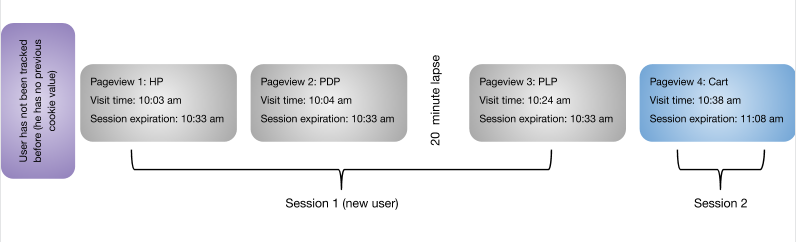
Experience Targeting Examples
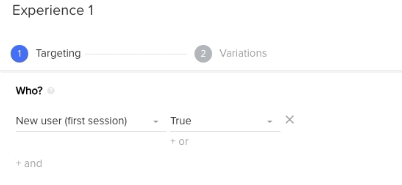
New User targeting condition in a Site Personalization Campaign
This condition is available on the Experience level. We will use it in order to target New or Returning users with relevant experiences.
New Users:
Welcome messaging
- Welcome new users to the site
- First purchase discount
- Newsletter/ Subscription sign-up
Exit survey
- Get feedback on UI from first-time users
Recommendations
- Use relevant strategies for first-time users;
- Homepage - Most Popular
- PDP - Purchased Together, Viewed Together, Similar
- PLP - Most Popular
Returning Users:
Cart Reminders
- Remind users that they have items in their cart
- Highlight free shipping thresholds based on items in cart
Recommendations
- Use relevant strategies for first-time users;
- Homepage - Affinity, Recently Viewed
- PDP - Affinity, Purchased Together, Viewed Together, Similar
- PLP - Affinity, Recently Viewed
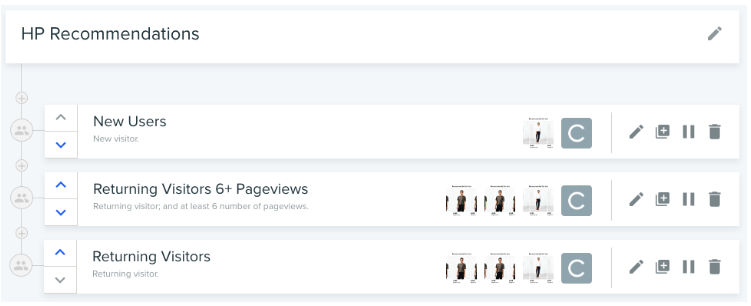
Recommendation Campaign for the Homepage, targeting New
and Returning (with over 6 pageviews, with under 6 pageviews) users with different strategies
Additional Resources
- Click to read more on creating notifications, out of the box templates and attribution methods.
Please sign in to leave a comment.
Comments
0 comments