Spa Events Targeting

We try to implement a SPA Event to change a Headline in a Ajax Application using a Custom Javscript Action.
From the documentation we don’t understand very well how to use the parameters and to target trigger the experience.
We see the SPA Event in the network calls, but we are not able to trigger the experience.
What we did for targeting:
- Trigger Page Load
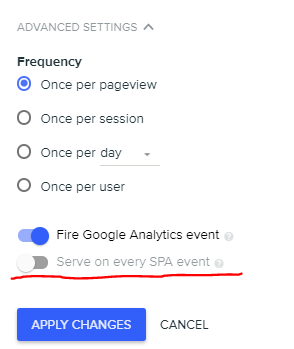
- Serve on Every Spa Event
Which of the parameters do we need?
- type or data or url?
We implemented the spa event:
DY.API(‘spa_start’, {
context: {
type: 'Homepage,
},
url: ‘a self defined url’,
countAsPageview: true
});
Do we need to implement the data: [‘XXXX’] as event trigger?
-

Hi Antaje,
Any idea if the custom action code is actually triggered (if you use console.log, do you see it after the spa call)?
If you don’t think the code is running then you can try the following:-
Check you don’t have any race conditions:
1a. Do you wait for the selector you are trying to modify?
1b. Any chance your spa_end is running before the content is replaced (and maybe the change is being overridden by the new content?) -
Did you use the ‘spa_end’ call after the new content is fully rendered (and not just ‘spa_start’)?
SPA page in the support site, bullet 2:
https://support.dynamicyield.com/hc/en-us/articles/360022956414-Support-for-Websites-using-Single-Page-Applications-SPA- -
Did you toggle turn the “Serve on every spa event” toggle on for your custom action in the UI?
-
If none of the above worked, please try to replace both your spa_start and spa_end with the “simple” spa call. example from bullet 3 in the support site:
DY.API(‘spa’, {
context: {
type: ‘PRODUCT’,
data: [‘product-sku’]
},
url: ‘https://store.example.com/buy/product-sku.html’,
countAsPageview: true
});
-
-
Hi Meira, thanks for your Reply.
We see the Code running in the network calls. But we wonder if the Spa Code we implemented is correct.
Do we need to use as context type ‘PRODUCT’? We used context type Homepage - wrong? We didn’t implement the parameter data. Is it mandatory? Are these the parameter that are used for targeting? Which target has to be selected? A Event?
-
Hi,
There is no problem using context type ‘HOMEPAGE’. In general the context is used to report what is the user is currently viewing. so the user just visited the homepage, you should report ‘HOMEPAGE’, and for a product page you should report ‘PRODUCT’. the ‘data’ attribute is only required for non-homepage/other context types.Please check our context page in the support site for more information:
https://support.dynamicyield.com/hc/en-us/articles/360022955254-Configuring-Page-Context-for-your-SiteThe idea behind a pageload context is exactly the same as the context you report in your ‘spa’ event.
-
Hi, thanks again for your reply.
That’s the code we implemented.DY.API(‘spa_start’, {
context: {
type: ‘HOMEPAGE’
},
url: http://www.mydomain.de/mysite.jsp’,
countAsPageview: true
});DY.API(‘spa_end’);
DY.API(“event”, {
name: “dy_checkout_bestelluebersicht”
});And than we target the event “dy_checkout_bestelluebersicht” to create the experience.
So your recommendation would be as followed?DY.API(‘spa’, {
context: {
type: ‘HOMEPAGE’,
},
url: http://www.mydomain.de/mysite.jsp’,
countAsPageview: true
});DY.API(“event”, {
name: “dy_checkout_bestelluebersicht”
});And then we target the event? We want to replace the site headline, which is not affected by the ajax-content-replacement.
-
Hi Antje,
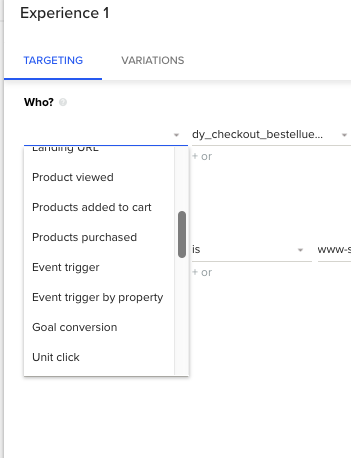
DY.API(‘spa’) should be instead of DY.API(‘spa_start’)->DY.API(‘spa_end’) implementation, and not in addition to it.Please keep in mind that using event targeting is session based, meaning that your experiment will run on every pageload/spa in this session, after the event was triggered.
if your action to run only after the event, you should set it in the trigger settings and not in your targeting:
BTW, if you still having trouble running your code exactly when you want it, I do recommend you try our live chat support under ‘need help’ in the DY admin.
-

DY.API(‘spa’, {
context: DY.recommendationContext,
url: ‘https://store.example.com/buy/product-sku.html’,
countAsPageview: false
});

Por favor, entrar para comentar.
Comentários
8 comentários